

您的位置:極速下載站 → 電腦軟件 → 系統軟件 → 系統檢測 → Funduc Application Inventory
- 軟件介紹
- 下載地址
- 網友評論
應用程序清單是一個實用工具,掃描您的系統已安裝的程序,并生成一個可配置的報告,列出有關的文件,發現文件的版本信息。可選的后續掃描,然后自動啟動交叉引用窗口。LNK快捷方式和/或在Windows注冊表中引用的文件的掃描結果。圖標指標顯示存在。LNK和/或注冊表引用。文件的屬性,快捷方式和注冊表項的細節都突出一個文件,然后使用“屬性”和“參考文獻”對話框。包含和排除過濾器可用于定義掃描路徑和/或文件的版本信息中找到的字符串(S)。在結果中包括的領域配置。例如,你可以列出(或)文件版本,文件描述,內部名稱,版權,文件路徑等。結果可以復制到剪貼板,打印,或保存在一個分隔指定的文件。應用程序清單也可以啟動Windows資源管理器包含在結果列表中的文件的路徑上。
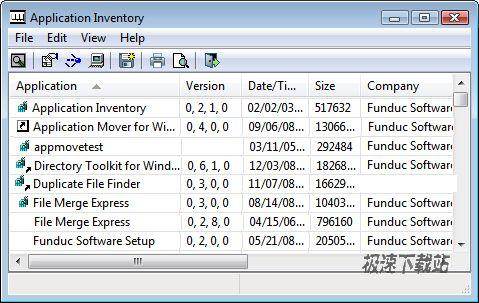
Application Inventory is a utility that scans your system for installed programs and generates a configurable report listing file version information about the files that that were discovered. Optional follow-up scans can are then automatically initiated to cross-reference the file scan results with windows .lnk shortcuts and/or references in the windows registry. Icon indicators show the presence of .lnk and/or registry references. Details on file properties, shortcuts, and registry keys are available by highlighting a file and then using 'Properties' and 'References' dialogs. Include and exclude filters can be used to define the scan by path &/or string(s) found in file version information. The fields included in the results are configurable. For example, you can list (or not) File Version, File Description, Internal Name, Copyright, File Path, etc. Results can be copied to the clipboard, printed, or saved in a delimited file you specify. Application Inventory can also launch windows explorer on the path containing a file in the results list.
官方網站:http://www.funduc.com/app_inv.htm
相關搜索:安裝程序 Funduc Application

48.03 MB / 2021/11/16

0 KB / 2021/10/28

87 MB / 2021/10/26

416 KB / 2021/10/22

3.08 MB / 2021/10/20

11.09 MB / 2021/10/16

3.61 MB / 2021/10/11

2.04 MB / 2021/10/10
- 共 0 條評論,平均 0 分 我來說兩句
- 人氣英雄聯盟下載官方下載
- 《英雄聯盟》(簡稱LOL)是由美國拳頭游戲(Riot Games)開發、中國大陸地區騰訊游戲代理運營的英雄對戰MOBA... [立即下載]
- 好評有道詞典 8.5.3.0 官方版
- 經常在電腦上閱讀英語文檔,或者是需要在電腦上翻譯某一些英語詞句?極速小編給各位推薦一款優秀的中英翻譯... [立即下載]


