

您的位置:極速下載站 → 電腦軟件 → 系統(tǒng)軟件 → 磁盤工具 → Funduc Application Mover
- 軟件介紹
- 下載地址
- 網(wǎng)友評論
應用捷運是一種工具,重新定位從一個路徑到另一個硬盤上安裝的程序。應用捷運“當前路徑”字段中指定的路徑中找到的文件(見下文),將它們移動到“新路徑”的路徑。應用捷運在“當前”字段和'新'的路徑改變這些引用文件位于Windows注冊表進行掃描。應用捷運在“開始”菜單中還可以掃描所有的Windows快捷方式和調(diào)整到新的程序位置的路徑引用。最后,在原來的程序路徑。INI和INSTALL.LOG文件檢查字符串匹配老路位置。如果發(fā)現(xiàn),這些字符串改變到新的位置。確認對話框,如果你啟用“確認更改”復選框(見下文)。如果一個文件是“忙”,不能更改到新的位置,重新啟動提示提供。掛起的更改,然后重新啟動后完成。
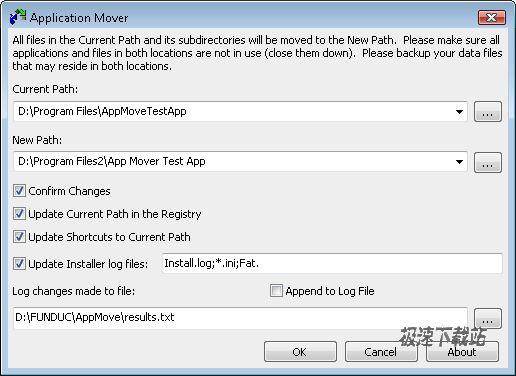
Application Mover is a tool that relocates installed programs from one path to another on your hard disk. Application Mover takes files found in the path specified in the 'Current Path' field (see below) and moves them to the 'New Path' path. Application Mover scans the windows registry for references to files located in the 'Current' field and changes those references to the 'New' path. Application Mover also scans all windows shortcuts in the Start Menu and adjusts path references to the new program location. Finally, *.ini and Install.log files present in the original program path are checked for strings matching the old path location. If found, these strings are changed to the new location. Confirmation dialogs are available if you enable the 'Confirm changes' checkbox (see below). If a file is 'busy' and cannot be changed to the new location, a reboot prompt is offered. Pending changes are then completed after the reboot.
官方網(wǎng)站:http://www.funduc.com/app_mover.htm
相關(guān)搜索:Funduc Application 數(shù)據(jù)移動

15.05 MB / 2021/11/22

18.01 MB / 2021/11/19

17.35 MB / 2021/11/12

403 KB / 2021/11/10

12.23 MB / 2021/10/31

403 KB / 2021/10/16

2.22 MB / 2021/10/14

3.67 MB / 2021/10/11
- 共 0 條評論,平均 0 分 我來說兩句
- 人氣英雄聯(lián)盟下載官方下載
- 《英雄聯(lián)盟》(簡稱LOL)是由美國拳頭游戲(Riot Games)開發(fā)、中國大陸地區(qū)騰訊游戲代理運營的英雄對戰(zhàn)MOBA... [立即下載]
- 好評QQ拼音輸入法 6.2.5507.400 官方版
- QQ拼音是騰訊推出的一款只能拼音輸入法。和大部分只能拼音輸入法一樣,QQ拼音同樣支持詞組輸入,詞頻排序,... [立即下載]
更多同類軟件推薦





- 34156Samsung SSD Magician 5.2.1 中文...
- 19778分區(qū)助手 8.2 專業(yè)版
- 8247希捷硬盤向?qū)?16.1 官方簡體中文...
- 7780BOOTICE 1.3.4.0 官方版
- 7052東芝U盤分區(qū)加密軟件 1.1.2.4 單...
- 5737U盤啟動大師專業(yè)版 7.1 官方版
- 5257EASEUS Partition Master 13.0.0...
- 4987硬盤分區(qū)魔術(shù)師 10.0 中文綠色版...
- 4753IObit Smart Defrag 6.2.5.129 中...
- 4278Galaxy SSD影馳固態(tài)硬盤工具 2.0...