
軟件百科中的詞條內容僅供參考,如果您需要解決具體問題(尤其在法律、醫學等領域),建議您咨詢相關領域專業人士。
極速搜搜 最新:
WinRAR
相關tags:WinRAR
軟件簡介
WinRAR 是一款功能強大的壓縮包管理器,它是檔案工具RAR 在 Windows 環境下的圖形界面。該軟件可用于備份數據,縮減電子郵件附件的大小,解壓縮從 Internet 上下載的 RAR、ZIP 2.0 及其它文件,并且可以新建 RAR 及 ZIP 格式的文件。
軟件截圖
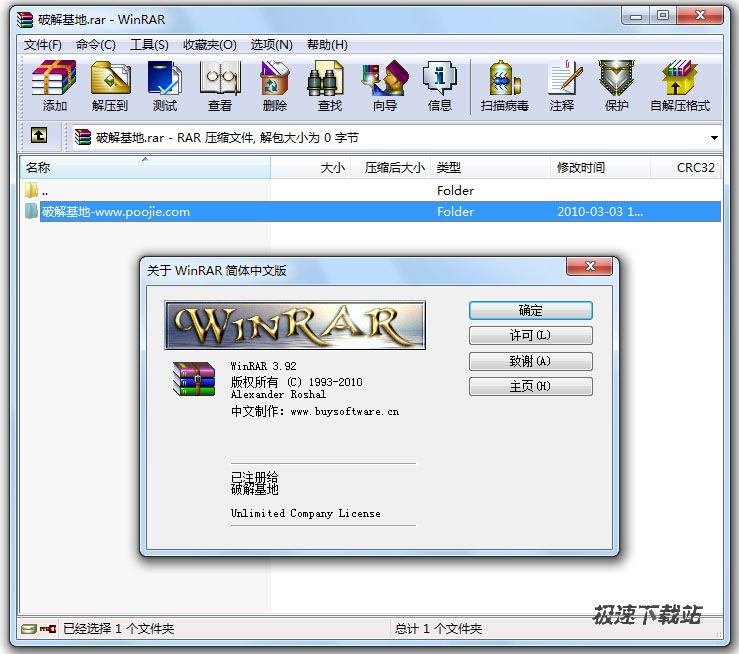
軟件特性
* WinRAR 采用獨創的壓縮算法。這使得該軟件比其他同類 PC 壓縮工具擁有更高的壓縮率,尤其是可執行文件、對象鏈接庫、大型文本文件等。RAR 在 DOS 時代就一直具備這種優勢,經過多次試驗證明,WinRAR 的 RAR 格式一般要比 WinZIP 的 ZIP 格式高出 10%~30% 的壓縮率,尤其是它還提供了可選擇的、針對多媒體數據的壓縮算法。
* WinRAR 針對多媒體數據,提供了經過高度優化后的可選壓縮算法。WinRAR 對 WAV、BMP 聲音及圖像文件可以用獨特的多媒體壓縮算法大大提高壓縮率,雖然我們可以將 WAV、BMP 文件轉為 MP3、JPG 等格式節省存儲空間,但不要忘記 WinRAR 的壓縮可是標準的無損壓縮。
* WinRAR 支持的文件及壓縮包大小達到 9,223,372,036,854,775,807 字節,約合 9000 PB 。事實上,對于壓縮包而言,文件數量是沒有限制的。
* WinRAR 完全支持 RAR 及 ZIP 壓縮包,并且可以解壓縮 CAB、ARJ、LZH、TAR、GZ、ACE、UUE、BZ2、JAR、ISO、Z、7Z 格式的壓縮包。雖然 WinZIP 也能支持 ARJ、LHA 等格式,但卻需要外掛對應軟件的 DOS 版本,實在是功能有限。但 WinRAR就不同了,不但能解壓多數壓縮格式,且不需外掛程序支持就可直接建立 ZIP 格式的壓縮文件,所以我們不必擔心離開了 WinZIP 如何處理ZIP 格式的問題。
* WinRAR 支持 NTFS 文件安全及數據流。
* WinRAR 提供了 Windows 經典互交界面及命令行界面。讓我們通過開始選單的程序組啟動 WinRAR,在其主界面中選擇“選項”選單下的“設置”打開設置窗口,分為常規、壓縮、路徑、文件列表、查看器、綜合六大類,非常豐富,通過修改它們,可以更好地使用 WinRAR。
WinRAR 仍支持類似于 DOS 版本的命令行模式,格式為:
WinRAR <命令> -<開關> <壓縮包> <文件...> <解壓縮路徑\>
a 壓縮,e、x 解壓等常用參數基本無異于DOS版本,可以在批文件中方便地加以引用。
* WinRAR 提供了創建“固實”壓縮包的功能,與常規壓縮方式相比,壓縮率提高了 10% - 50% ,尤其是在壓縮許多小文件時更為顯著。
* WinRAR 具備使用默認及外部自解壓模塊來創建并更改自解壓壓縮包的能力。
* WinRAR 具備創建多卷自解壓壓縮包的能力。
* 能建立多種方式的全中文界面的全功能(帶密碼)多卷自解包 。我們知道不能建立多卷自解包是WinZIP的一大缺陷,而WinRAR處理這種工作卻是游刃有余,而且對自解包文件還可加上密碼加以保護。
* WinRAR 能很好地修復受損的壓縮文件。在網上下載的ZIP、RAR類的文件往往因頭部受損的問題導致不能打開,而用WinRAR調入后,只須單擊界面中的“修復”按鈕就可輕松修復,成功率極高,大家不妨一試。 即使壓縮包因物理原因損壞也能修復,并且可以通過鎖定壓縮包來防止修改。身份認證信息可以作為安全保證來添加,WinRAR 會儲存最后更新的壓縮包名稱的信息。
* WinRAR 輔助功能設計細致。可以在壓縮窗口的“備份”標簽中設置壓縮前刪除目標盤文件;可在壓縮前單擊“估計”按鈕對壓縮先評估一下;可以為壓縮包加注釋;可以設置壓縮包的防受損功能,等等細微之處也能看出WinRAR的體貼周到。
* WinRAR 可防止人為的添加、刪除等操作,保持壓縮包的原始狀態。
更新歷史
Version 4.01 beta 1
1. Added support for file sizes stored in binary format in TAR archives.
Some TAR archives use the binary size format instead of octal
for files larger than 8 GB.
2. Bugs fixed:
a) "Repair" command failed to properly reconstruct structure
of RAR archives, which contained at least one file with packed
size exceeding 4 GB.
This bug did not affect the recovery record based repair.
It happened only if recovery record was not found and WinRAR
performed reconstruction of archive structure;
b) even if "Do not extract paths" option in "Advanced" part of
extraction dialog was set as the default, WinRAR still unpacked
file paths if called from Explorer context menu;
c) after entering a wrong password for encrypted ZIP archive,
sometimes WinRAR ignored subsequent attempts to enter a valid
password;
d) "Wizard" command did not allow to create self-extracting
and multivolume archives, when compressing a single folder
or a file without extension;
e) "Import settings from file" command did not restore multiline
comments in WinRAR compression profiles;
f) when converting RAR volumes having name1.name2.part#.rar name format,
"Convert archives" command erroneously removed ".name2" name part.
So resulting archive had name1.rar file name instead of expected
name1.name2.rar;
g) RAR could crash when creating a new archive with -agNNN switch
if archive number in generated name was 110 or larger.
Version 4.00
1. RAR decompression speed is improved. Depending on data type,
decompression can be up to 30% faster than in previous versions.
Both the general RAR algorithm and most of special RAR multimedia
methods benefit from this improvement. The only module of RAR
algorithm, which is not affected, is "Text compression" method.
2. Changes in ISO support:
a) UDF support is upgraded to UDF 2.50 revision. It makes possible
to unpack most of Blu-ray ISO files;
b) when browsing UDF ISO file, UDF revision number is displayed
after the "UDF" format name in WinRAR address bar
and in archive information dialog;
c) WinRAR sets the folder modification date when unpacking folders
stored in UDF and ISO9660 files.
3. Changes in password dialog:
a) WinRAR uses the same format of password dialog both when archiving
and extracting, so "Show password" option is available also
when extracting;
b) "Organize passwords..." button in password dialog provides
access to password organizer interface, where you can specify
your frequently used passwords. You will be able to access these
saved passwords using the drop down list or autocomplete feature
in password dialog.
It is important to know that saved passwords are not encrypted
and anybody having access to your computer can view them.
Use "Organize passwords" feature only if your computer is
protected from unauthorized access;
c) "Use for all archives" option is available in password dialog
when unpacking several archives at once. You can utilize it
to apply an entered password to all archives.
If you use this option with an empty password, WinRAR will skip
all encrypted archives;
d) Unlike previous versions, the password from default compression
profile is not used for extraction.
If you wish to use the same password for all extracting archives,
press "Organize passwords..." button in the password dialog
and define a new password entry, specifying "*" file mask
in "Select for archives" field.
4. In Windows 7 WinRAR will display the total operation progress
also on WinRAR icon on Windows taskbar. You can disable it using
"Taskbar progress bar" option on "General" page of WinRAR settings.
5. Numerous Unicode support improvements allow to process non-English
file names more smoothly. These improvements include:
a) better Unicode handling in WinRAR in "Rename", "Convert",
"Find" and other commands, in folder tree panel, in password
request dialog and in many other parts of WinRAR interface;
b) correctly displayed Unicode names in WinRAR items in Explorer
context menus;
c) Unicode support in .lng files, making WinRAR localization
possible for Unicode only languages.
6. Changes in -x switch syntax. Now you can specify a wildcard
exclusion mask for folders. Such mask must have the trailing '\'
character, like -x*tmp*\ or -x*\temp\
7. New "Extract relative paths" option in "Advanced" part of extraction
dialog. If you browse some archive subfolder in WinRAR shell
and enable "Extract relative paths" option, the path part up to
and including the current subfolder will be removed from extracted
file paths.
For example, if you are inside of "Backup\MyData" archive folder
and extract "Images" folder, it will be extracted as "Images",
not as "Backup\MyData\Images".
This option is the new default extraction mode, but you can change
the default back to WinRAR 3.x style. Just select "Extract full paths"
and then press "Save settings" in "General" part of extraction dialog.
8. Windows 98, Windows Me and Windows NT are not supported by WinRAR
and WinRAR self-extracting modules anymore. Minimum Windows version
required for WinRAR 4.0 is Windows 2000.
9. If TAR, TAR.GZ or TAR.BZ2 archive contains symbolic or hard links
and if destination file system is NTFS, WinRAR will create these
links when unpacking such archive. WinRAR will create symbolic links
as symbolic and hard links as hard in Windows Vista and newer
and it will create all links as hard in older Windows.
If destination file system is FAT32 or any other not supporting
file links, WinRAR will skip links when unpacking TAR, TAR.GZ
and TAR.BZ2 archives.
10. Recovery volume processing involves less disk seek operations
resulting in higher performance.
11. You can select Windows 7 library in tree panel in extraction dialog
and WinRAR will use its default save location as the destination path.
12. "Report" command allows to select HTML, Unicode text and usual text
as output format for report file. Unlike previous WinRAR versions,
now WinRAR preservers Unicode characters in reports when using HTML
or Unicode text format. So non-English characters in file names
will be displayed properly in such reports.
13. Message list in GUI SFX archives displays only operation status
and error messages. It does not contain names of all extracted files
anymore. This change improves the speed and reduces memory requirements
for SFX archives containing a large number of files. Also it makes
easier to locate error messages, because they are not hidden among
extracted file names.
14. GUI SFX archives display "Extract" button instead of "Install"
if no "Setup" or "Presetup" commands are present in the archive
comment. If you prefer "Install" button, but do not need to
execute any setup programs, you can add "Setup=<>" command.
15. WinRAR displays the current percent above the operation progress bar
when repairing an archive containing the recovery record
and when processing recovery volumes.
16. WinRAR limits the maximum possible volume size to 4 GB minus 1 byte
when creating RAR volumes on a disk with FAT or FAT32 file system
in volume size autodetecting mode. These file systems do not support
4 GB and larger files.
17. If "Wait if other WinRAR copies are active" option is enabled
and WinRAR waits for another copy, you can press "Continue" button
in command progress window to force WinRAR to stop waiting.
So now "Continue" button allows to override the state of
"Wait if other WinRAR copies are active" option for current operation.
18. WinRAR displays one password request instead of two, when saving
an encrypted file back to RAR or ZIP archive after modifying it
in some external editor. Previous WinRAR versions usually requested
the password twice, both when extracting the original file
and archiving its modified copy. Only RAR archives with encrypted
file names were processed with the single password prompt.
19. New error code 10 ("no files") is added to list of error codes
returned in command line mode by RAR and WinRAR. This new code
can be returned by archive, extract, delete and repair commands.
It means that RAR did not find any files matched the specified
file or archive mask.
20. File name area in file overwrite dialog occupies several lines now.
It makes possible to display much longer names.
21. Now switch -ep3 converts not only disk letters, but also UNC paths.
So will be converted to __server\share when archiving
and restored to the original when extracting with -ep3.
22. New "Background extraction" option in "Advanced" part of extraction
dialog places WinRAR into background, when extracting files.
You can save its default state with "Save settings" button in "General"
part of extraction dialog, just like for other extraction options.
"Background archiving" option from the default compression profile
does not affect the extraction behavior anymore.
23. "Mode..." button in operation progress window is enabled also
when extracting or testing archives. It provides access to
"Command parameters" dialog, where you can set "Turn PC off when done"
option for extraction and test operations.
Previously this dialog was accessible only when archiving.
24. Bugs fixed:
a) renaming a file in archive could also rename all other files
with the same name in other folders of the same archive;
b) previous versions displayed the wrong total packed size
in "Info" command for multivolume CAB archives;
c) in ZIP archives 'U' (update) and 'F' (fresh) commands could
erroneously update even files not specified in the command line.
It happened only for files in current folder which names matched
files in ZIP archive. This bug was not present in usual 'A' (add)
archiving mode.
Version 3.93
1. Bugs fixed:
a) in WinRAR 3.92 -xd:\path\folder switch could also exclude folders,
which path does not match the path specified in the switch
and only the folder name is the same as specified;
b) switches -y -or did not work correctly together. Switch -or was
ignored in presence of -y.
Version 3.92
1. If you start WinRAR command from Explorer context menu in multiple
monitor configuration, the command dialog will be displayed
on the same monitor as context menu. In previous versions it was
always displayed on primary monitor.
2. WinRAR "Compress and email..." context menu command adds the archive
name to email subject. Previous versions left the subject blank.
3. In RAR 3.91 -x switch could also exclude folders from archiving
even if mask contained wilcard characters and did not contain a path.
For example, -x*. excluded all those folders, which do not have
the extension in the name. Now -x switch uses RAR 3.80 approach
for masks without path, excluding folders only if mask does not
contain wildcards and matches the folder name exactly.
4. Bugs fixed:
a) WinRAR 3.91 reported the incorrect "Unexpected end of archive"
error, when opening an empty ZIP archive created with
"New WinRAR ZIP archive" context menu command;
b) if "Delete archive" option was enabled when unpacking several
ZIP archives and if one of archives was damaged, WinRAR did not
delete archives after the damaged one, even if they were unpacked
successfully;
c) if file matched two different masks in RarFiles.lst, WinRAR
could select the last match. Normally, if neither of masks
is a subset of another, the first match must be chosen.
Version 3.91
1. This version can decompress 7-Zip archives created with
LZMA2 algorithm.
2. Now a password is requested only once when unpacking 7z archives
with encrypted file names from context menu. WinRAR 3.90 asked it
twice.
3. This version can unpack tar.bz2 archives consisting of several
smaller bz2 streams merged together. Previous versions unpacked
only the first nested bz2 stream in such composite archive.
4. WinRAR displays CRC32 of files inside of usual .gz (not .tar.gz)
archives. Previous versions left this field blank for GZIP files.
5. Bugs fixed:
a) WinRAR 3.90 displayed "Save" button instead of "Open" or "OK"
in "Find archive" dialog ("Open archive" command in "File" menu
and "Browse..." command in archiving dialog);
b) WinRAR could display incorrect file names when browsing malformed
ZIP archives;
c) WinRAR 3.90 failed to decompress LZH archives created with
"-lh7-" algorithm;
d) WinRAR 3.90 could fail to delete a part of files after archiving
if delete to Recycle Bin was enabled. This bug was present
when working in Windows XP, but not in Windows Vista and Windows 7;
e) when unpacking ISO file using WinRAR "Extract files..." command
in Explorer context menu, WinRAR could unpack same archived files
twice during the same operation. It displayed the overwrite prompt
when unpacking files for the second time;
f) hexadecimal search in WinRAR 3.90 "Find" command and console RAR
"ih" command failed to find matches if first byte in search string
was greater than 127.
使用幫助
暫無!
關于開發商
暫無!
擴展閱讀
官方網站:http://rarlab.com/